
 8:17
OSI Model
Why VoIP Calls Drop at 32 Seconds: The Session Layer | OSI Layer 5
The delivery window, and the phone call that hangs up at thirty-two seconds.
8:17 Watch
Monday morning and the company website is "down" — except it isn't. Every browser shows the same red page: "Your connection is not private." Ping works, door 443 is open, the handshake completes, the data arrives, and every browser refuses to unwrap it. Nothing about the road, the address, the door or the conversation is broken. What's broken is the packaging. In this episode Professor Flows explains the Presentation layer using Byte City's packing room: the label printer, the vacuum sealer and the shrink-wrap.
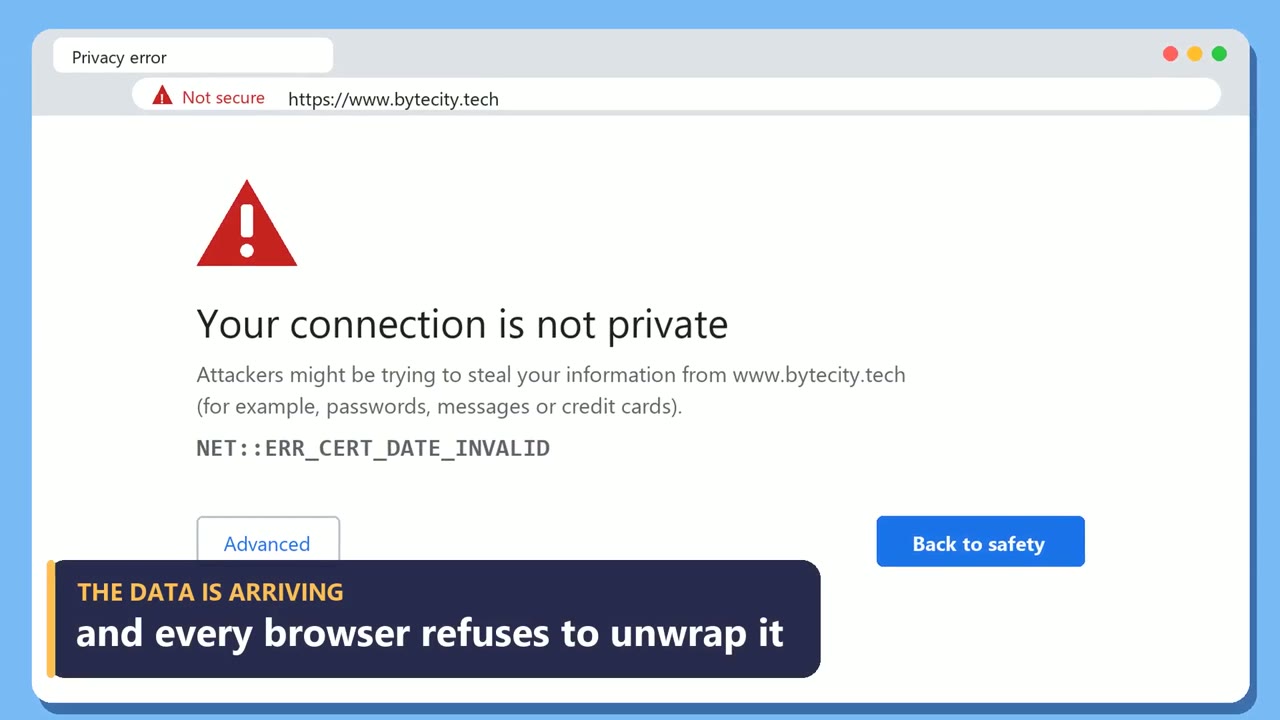
Monday morning, and the company website is down. Except it isn't. Every browser, on every device, shows the same red page: "Your connection is not private."
Ping works, so the road and the address are fine. Door 443 is open. The handshake from the Layer 4 lesson completes. The data is arriving, and every browser refuses to unwrap it.
Nothing about the road, the address, the door or the conversation is broken. What is broken is the packaging. That is Layer 6 of the OSI model: the Presentation layer.
The Layer 5 lesson kept the conversation going. But before anything is handed to the truck, the data goes through the packing room off the garage. The packing room has three machines.
The label printer. Before you send anything, both ends have to agree what the contents are. Letters are written as numbers. A picture is written as a grid of colours. A film is written as frames. The label says which code was used, so the far end can read it. That is encoding.
The vacuum sealer. Anything that can be made smaller is made smaller, so it costs less to carry. That is compression.
The shrink-wrap. The road is public. So the data is wrapped in something nobody on the road can see through, and only the far end has the tool to take it off. That is encryption.
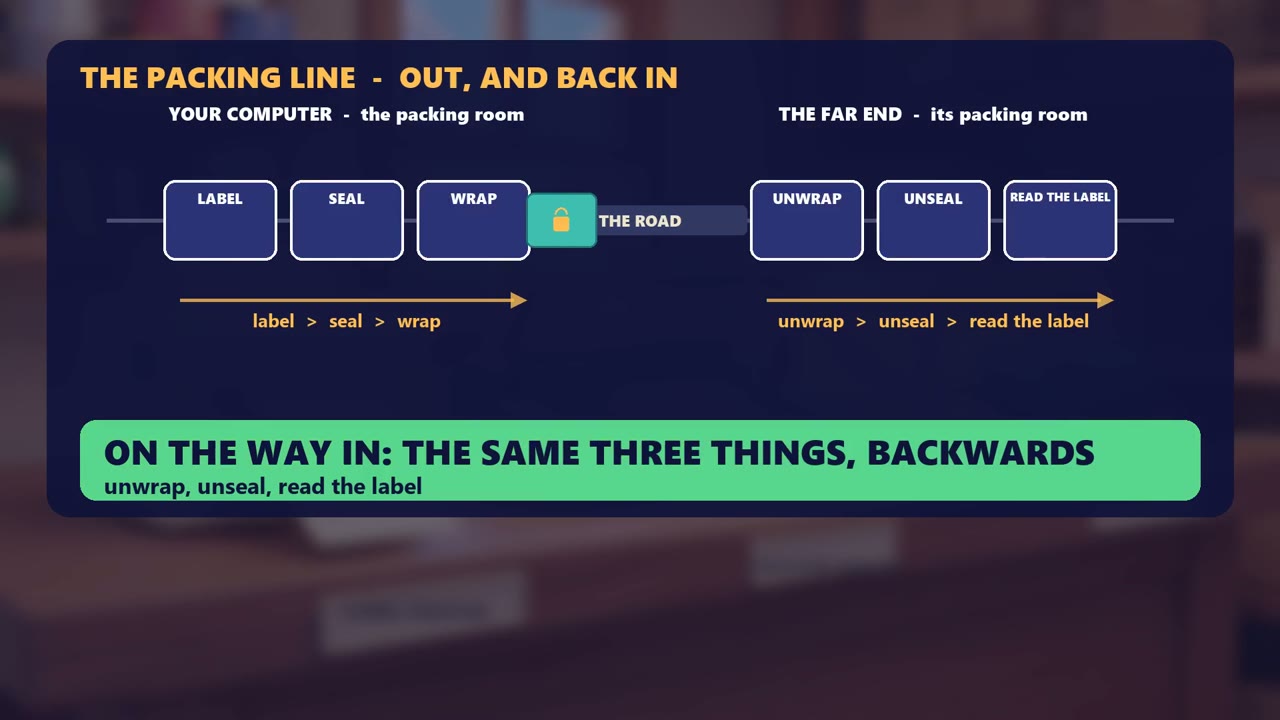
On the way out the order is label, seal, wrap. On the way in, the far end does the same three things backwards: unwrap, unseal, read the label. If any one of those steps fails, the data arrived, and nobody can use it.
All of this happens to the data itself, before the TCP tag is tied on and long before the mail bag and the crate.
A computer can't store the letter A. It stores a number, and both ends agree which number means A.
The oldest agreement you will meet is ASCII: 128 characters, enough for English and not much else. Today's agreement is UTF-8: every alphabet on Earth, every emoji, and it still reads plain ASCII exactly the same way.
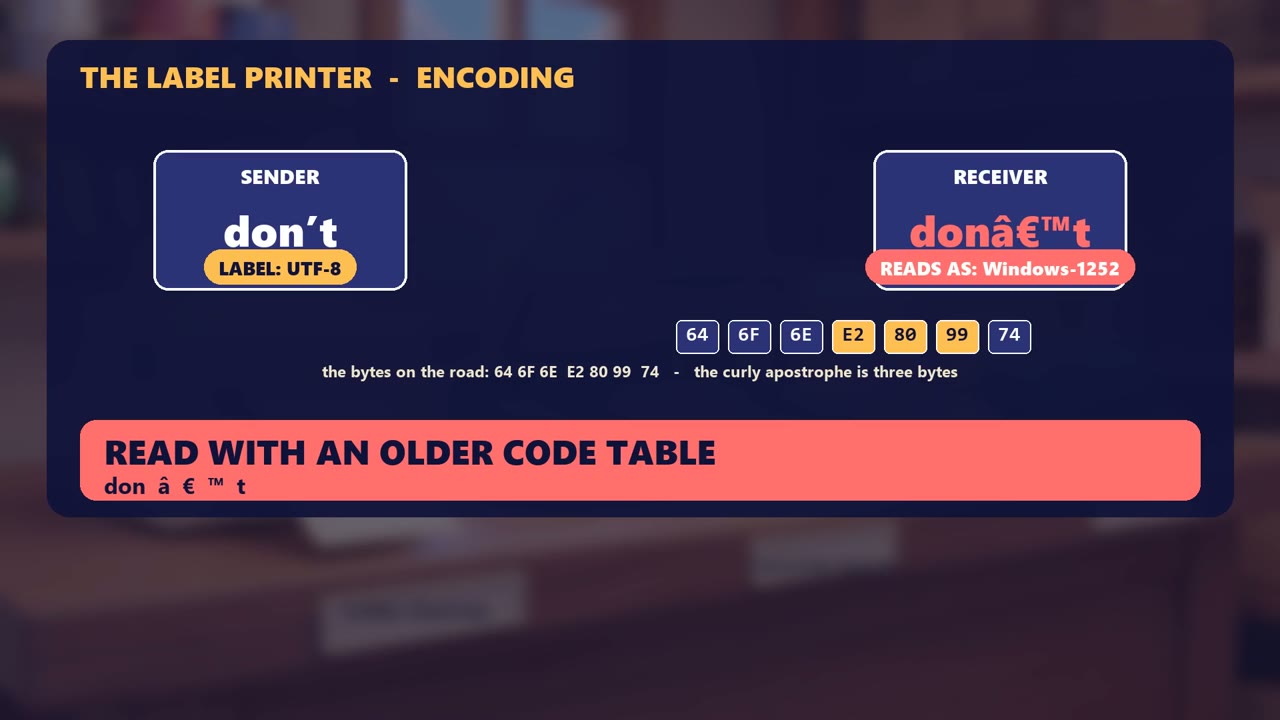
Here is what a wrong label looks like. Someone types "don't" with a curly apostrophe and sends it as UTF-8. The letters d, o, n and t are one byte each. The curly apostrophe is three bytes: E2 80 99.
The far end reads those bytes with an older code table, Windows-1252, which gives every single byte its own character. E2 becomes â. 80 becomes €. 99 becomes ™. So the far end shows:
don’t
That garble has a name: mojibake. Nothing was lost on the road. Every byte arrived. The label was wrong, so the far end misread every one of them. If you ever see ’ where an apostrophe should be, you are looking at UTF-8 read as Windows-1252.
The same idea covers pictures, sound and film. JPEG, PNG, MP3 and MP4 are each an agreement about how to write something down, so the other side can read it back. Layer 6 doesn't deliver any of it. It makes sure both ends are speaking the same code.
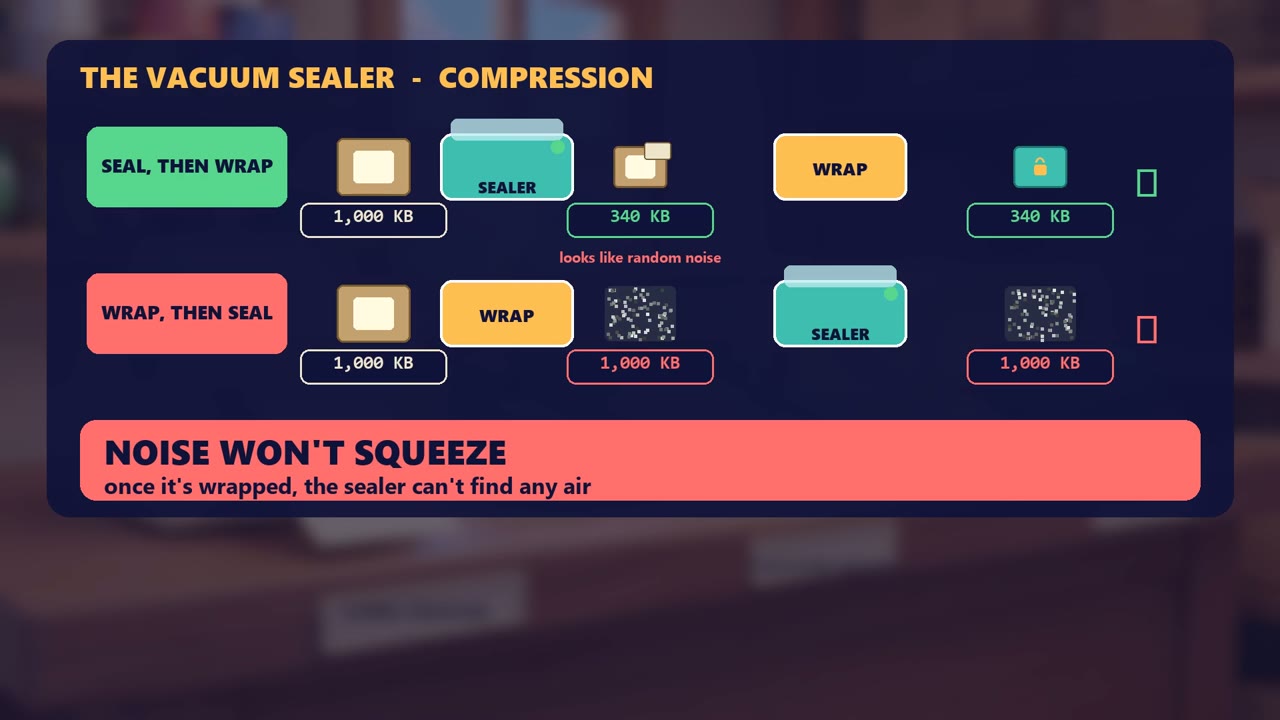
Most data is padded with air: repeated words, blocks of the same colour, silence. Compression squeezes the air out so the road carries less.
There are two kinds.
In the Layer 4 lesson, video you can rewind rode the truck. This is the room that made it small enough to.
And there is one rule of the line: seal before you wrap. Once something is shrink-wrapped, it looks like random noise, and noise won't squeeze. Compress first, then encrypt. Do it the other way round and the sealer has nothing left to remove.
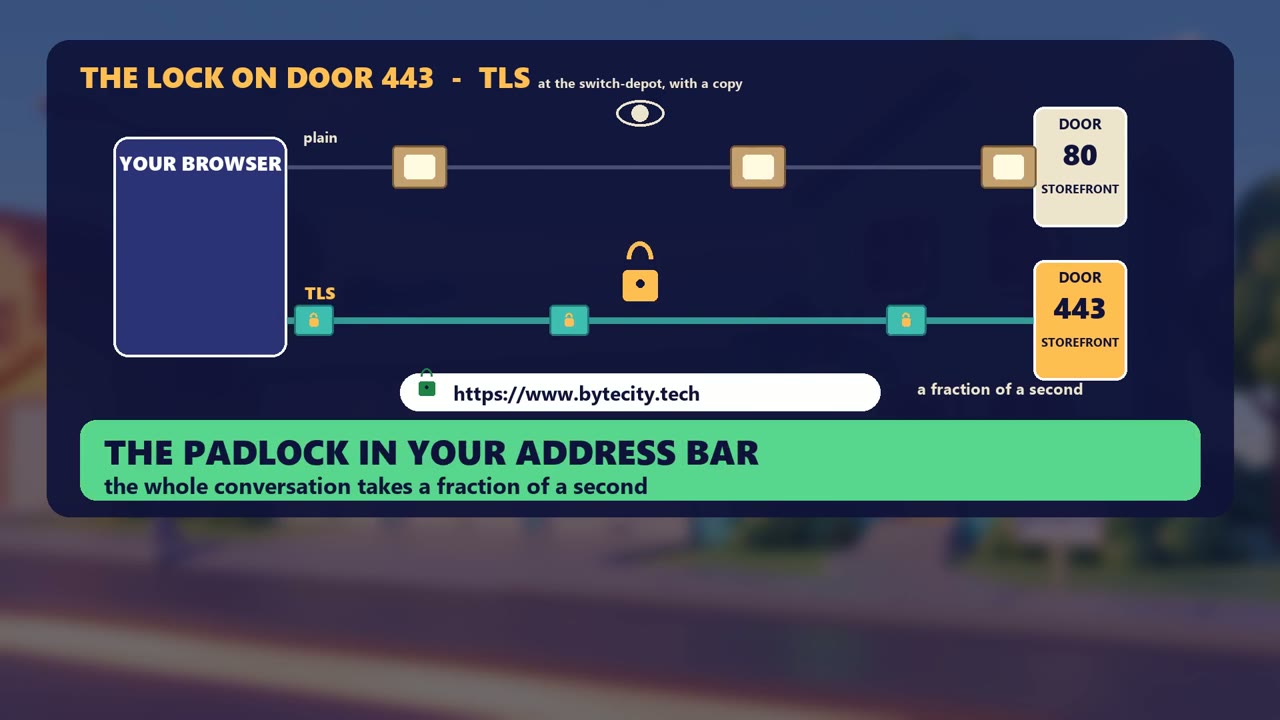
Now the shrink-wrap, and the lock on door 443 that earlier lessons promised.
The road is public. In the Layer 2 lesson, the switch-depot sometimes copies a crate out of every ribbon. In the Layer 1 lesson, Wi-Fi is shouted into the air. Anyone on the road with a copy of plain data can read it.
So we wrap it. Encryption scrambles the contents with a key, and only someone holding the matching key can unscramble them. Everyone else sees noise.
Door 80 is the storefront with no wrap. Door 443 is the same storefront with the lock, and the lock's real name is TLS. Before the first page is sent, three things happen:
In modern TLS (version 1.3) the first two steps overlap: the key agreement starts in the very first hello messages, so the ID card itself travels already wrapped. The three jobs are the same. The whole conversation takes a fraction of a second, and it is what the padlock in your address bar means.
The ID card has an expiry date. If the card is out of date, the browser does exactly what it should: it refuses to trust the wrap. That is our Monday morning.
| In Byte City | Real name |
|---|---|
| The packing room | The Presentation layer |
| The label printer | Encoding: character sets (ASCII, UTF-8) and data formats (JPEG, PNG, MP4) |
| The vacuum sealer | Compression, lossless or lossy |
| The shrink-wrap | Encryption |
| The lock on door 443 | TLS: a certificate, a key agreement, then a wrapped connection |
| The ID card | A certificate, issued by a certificate authority |
For the exam, the names filed under Layer 6 are TLS and its ancestor SSL, the picture and video formats, and the character sets.
The honest footnote from the Layer 5 lesson applies here too. There is no packing-room box in the wiring. The label is written by your application. The sealing is done by a library. The wrapping is done by a library inside your browser. Layer 6 is a job description.
And one more honesty: engineers argue about which layer TLS really belongs to. We file it where the exam files it, at Layer 6, and move on.
Back to Monday morning. Click the padlock, or the warning where the padlock should be, and the browser shows you the ID card. Issued to our website, www.bytecity.tech. Issued by Byte City Root CA, an authority it trusts. Valid from 20 September last year, to 20 September this year. Today is Monday, the 21st: the card ran out yesterday.
Nobody on the road tampered with anything. The card simply ran out, and every browser did its job. The warning code says so: NET::ERR_CERT_DATE_INVALID.
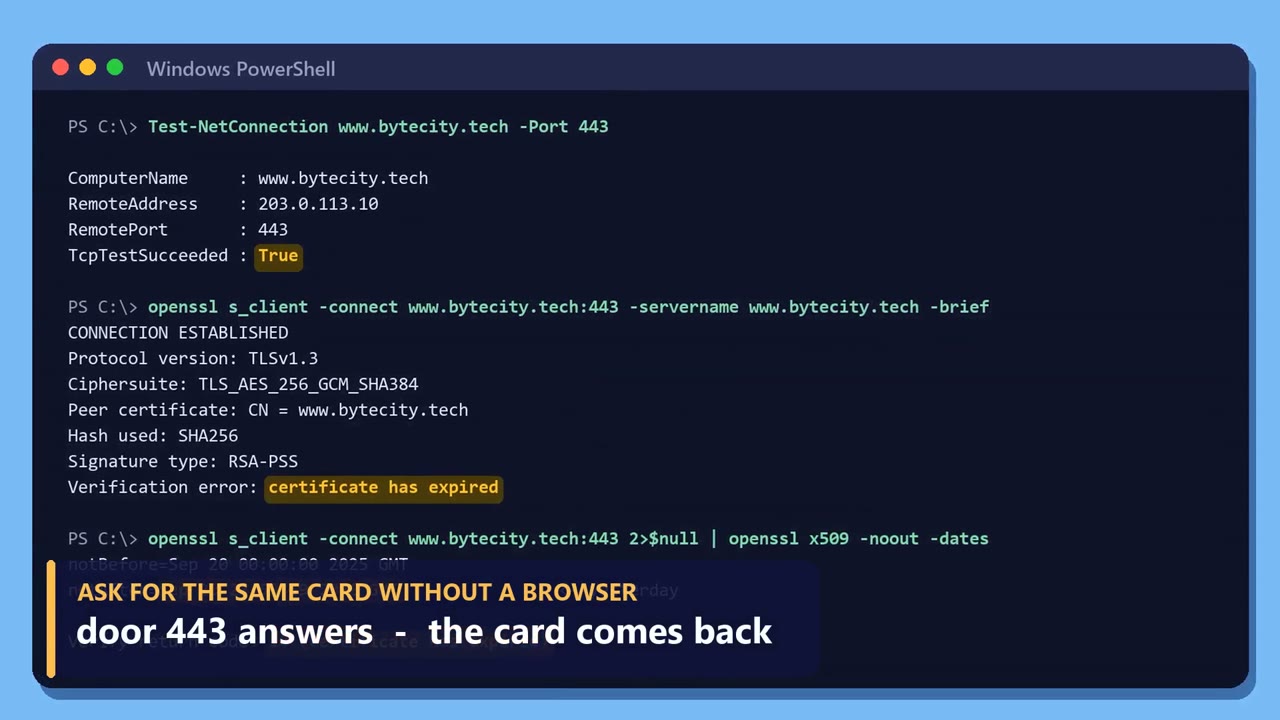
You can ask for the same card from a terminal, without a browser.
Test-NetConnection www.bytecity.tech -Port 443 returns TcpTestSucceeded : True. Door 443 answers, so Layer 4 is fine.openssl s_client -connect www.bytecity.tech:443 -servername www.bytecity.tech -brief opens the TLS conversation. The card comes back, and openssl reports: certificate has expired.openssl x509 -noout -dates and you see notAfter=Sep 20 23:59:59 2026 GMT. Yesterday. The full verify line reads Verify return code: 10 (certificate has expired).Renew the certificate with the certificate authority, install it on the web server, and check again. The new card is valid to 19 December, and the verify code goes to zero: 0 (ok). Certificates run out on a schedule, and the fix is never on the road. It is in the packing room.
One more, because you will meet it. An email arrives full of strange characters where the apostrophes should be: "Please don’t restart the server until we’ve renewed the certificate". Open the message headers and look at its label, the character set: Content-Type: text/plain; charset=ISO-8859-1. The sender's label named one code, and the message was actually written in another, UTF-8. Nothing was lost; it was misread. Change the label to charset=UTF-8, and the words come back.
For the Network+ exam: encryption, compression and data-format conversion are functions of which OSI layer? Layer 6, Presentation. The shrink-wrap, the sealer and the label.
Layer 6 makes sure the data can be read and trusted at the far end. It covers encoding (agreeing how characters and media are written as numbers), compression and encryption. In practice, those jobs are done by your applications and their libraries, not by a separate box.
Your browser reached the server, but it would not trust the certificate the server presented. The most common cause is an expired certificate, shown as `NET::ERR_CERT_DATE_INVALID`. The fix is on the server: renew and install the certificate.
The CompTIA Network+ exam files TLS and SSL under Layer 6, the Presentation layer, alongside encryption. Engineers argue about where TLS really belongs. For the exam, answer Layer 6.
The text was written in UTF-8, where the curly apostrophe is three bytes, and read with an older code table like Windows-1252, which turns each byte into its own character. Nothing is missing. Read the text with the right character set, UTF-8, and it displays correctly.
Lossless compression, such as zip and PNG, gives you back exactly what went in. Lossy compression, such as JPEG, MP3 and most video, throws away detail you are unlikely to notice, and that detail is gone for good.
Five questions on this lesson. Pick an answer to see why.
Previous
8:17The delivery window, and the phone call that hangs up at thirty-two seconds.
Next
 8:07
The storefront, the mail room and the Yellow Pages, where every conversation begins.
Related
 9:50
A city, seven floors, and why the model lost as a design and won as a language.
Related
 9:32
Numbered doors, the truck that calls ahead and the bullhorn that doesn't.
Exam objectives: CompTIA Network+ N10-009: 1.1 (OSI model, Layer 6), 1.4 (HTTPS 443, TLS), 4.1 (encryption in transit), 5.5 (troubleshooting a certificate error).
Byte City is not affiliated with or endorsed by CompTIA.