
 8:28
OSI Model
What Happens When You Click a Link: All 7 OSI Layers in One Trip
One click, seven floors down, across the city, and back. Every layer in one trip.
8:28 Watch
Monday morning, five help-desk tickets, and every one says the same four words: "the internet is down." Five identical sentences, five completely different causes, on five different floors of the building. This is the last lesson of the OSI Model series and the reason the map exists: five questions, asked from the bottom up, each with its tool and its ticket.
Monday morning, nine o'clock. Five tickets are waiting on the help desk, and every one of them says the same four words: "the internet is down."
Five identical sentences. Five completely different causes, on five different floors of the building.
By the end of this lesson you will tell them apart with five questions, asked from the bottom up. This is the reason the map exists.
When a delivery doesn't come back, the temptation is to guess. Reboot it. Reinstall it. Blame the Wi-Fi.
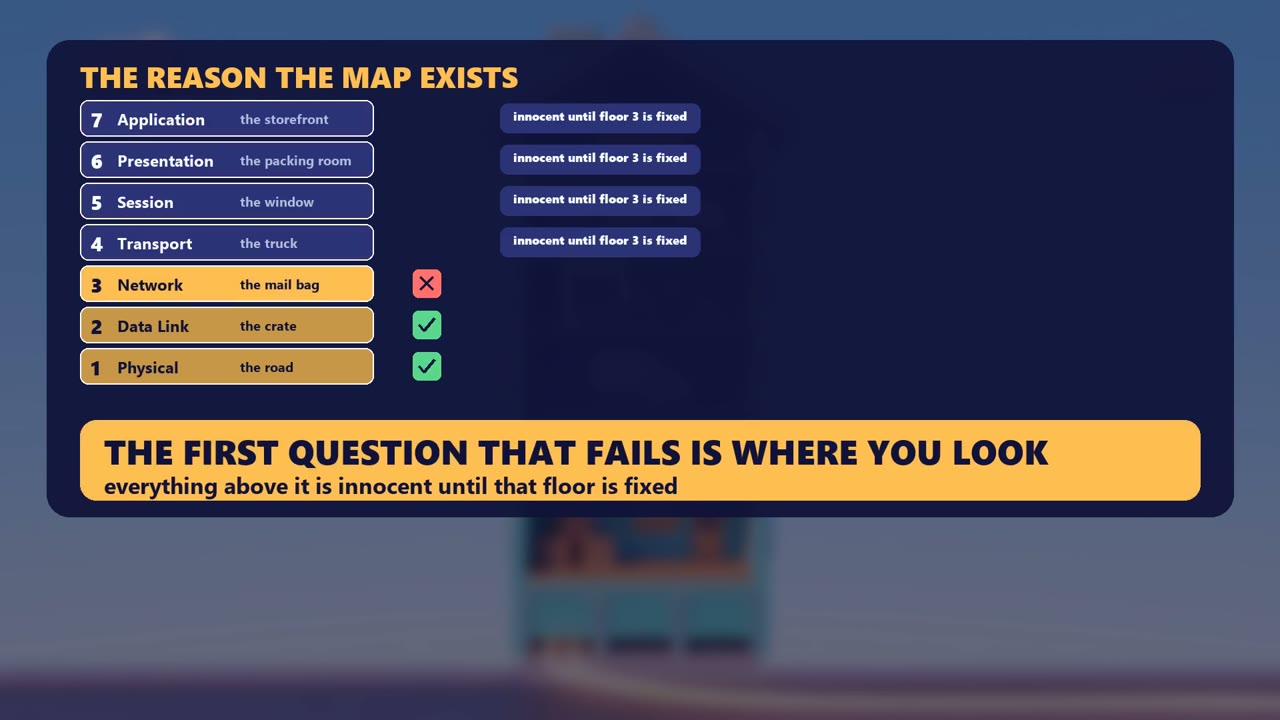
The map says: don't guess. Every floor depends on the floor beneath it. A slip cannot leave the storefront if the road outside is broken. So you start at the road, and you climb, one question per floor. The first question that fails tells you where to look, and everything above it is innocent until that floor is fixed.
Why from the bottom? Because a fault low in the building wears every disguise above it. One broken cable looks like a web problem, an email problem and a DNS problem all at once. Fix the road, and three tickets close themselves.
The five questions are the same five the OSI Model overview asked, in the same words and the same order. Now each one gets its tool, and its ticket. Floors 5 and 6 don't get a question of their own; they come back at the end, above the door.
Question one: is there a link light? This is Layer 1, the road. Look at the lamp on the house. Look at the port. Then ask the machine with ipconfig. If it says "Media disconnected", the road is out, and nothing above it matters yet.
Ticket one: the office moved a cabinet on Friday, and a wheel went through the cable. Dark lamp. Fix the road.
Question two: can the machine see its neighbours on the street? This is Layer 2, the crate and the brass plaque. Ping the machine next door, 192.168.1.20, and then run arp -a to see which plaques your machine has learned. If the neighbour never answers and no plaque was learned, the crates aren't crossing the street.
Ticket two: a replaced network card. This is the stranger from the Layer 2 lesson. The lamp is green, the card has a new plaque, and the switch-depot's allow-list still has the old one. Update the list.
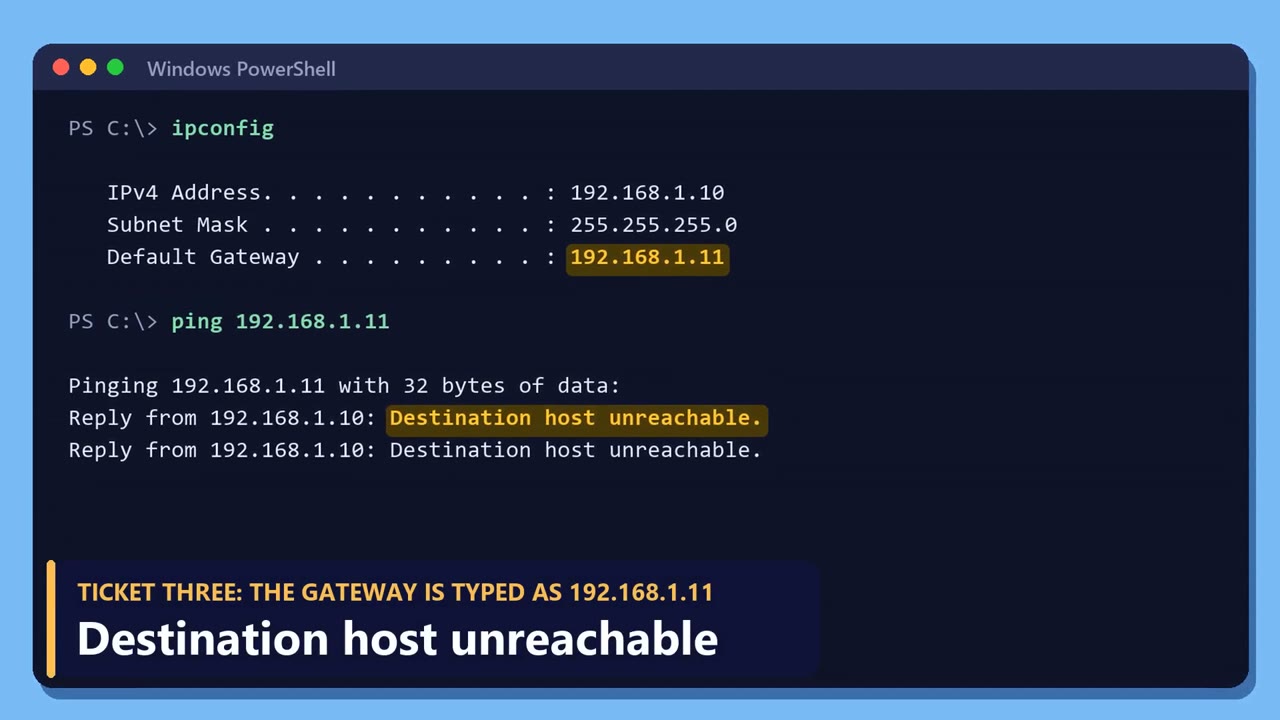
Question three: can it reach the gateway at the end of the street? This is Layer 3, the mail bag. Read the gateway line in ipconfig, and ping that address: the gate this machine believes in, not the one you believe in. If the neighbour answers and the gate doesn't, look at the bag's addressing.
Ticket three: ipconfig says the gateway is 192.168.1.11. Ping it, and the answer is "Destination host unreachable", sent back by the machine itself. Nobody lives at .11. It's a typo, a gate that doesn't exist. Had you pinged 192.168.1.1 because that is where gateways usually live, it would have answered, and the fault would have stayed hidden.
And remember the rule with no exceptions: the gateway MUST be on the same network as the host. Your gate is always on your own street. Fix the number.
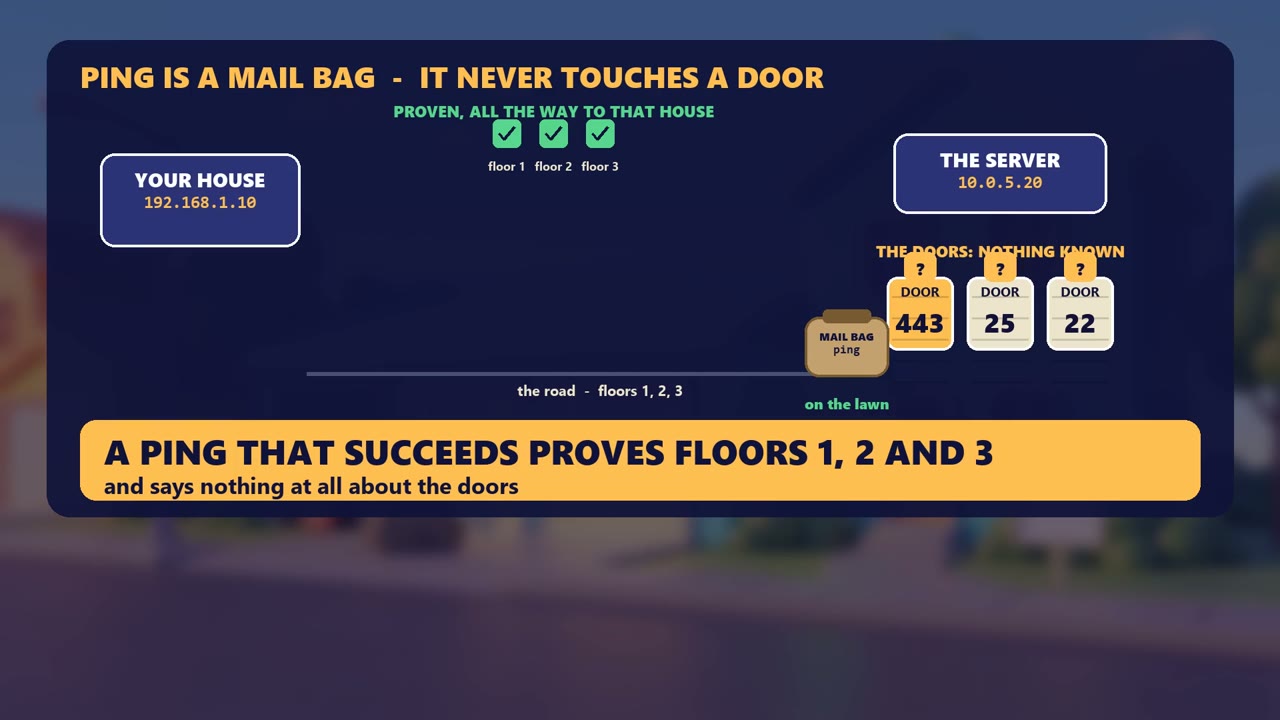
Question four: is the door actually open on the far end? This is Layer 4, the truck. And here is the trap: ping is a mail bag. It rides Layer 3, it lands on the lawn, and it never touches a door. So a ping that succeeds proves floors 1, 2 and 3 all the way to that house, and says nothing at all about the doors.
Test the door itself. On Windows, Test-NetConnection 10.0.5.20 -Port 443 tries to open door 443. The answer is the screen from the Layer 4 lesson: PingSucceeded: True. TcpTestSucceeded: False.
Ticket four: the building is there, and the storefront is rolled shut. Either the service behind door 443 has stopped, or a firewall is in the way.
Question five: does the name resolve to a street number at all? This is Layer 7, the Yellow Pages. Ping an address out on the internet, 8.8.8.8, and then ping the name. If the address works and the name doesn't, it's DNS. nslookup shows you the shout, and the silence: "DNS request timed out."
Ticket five: the Yellow Pages office has stopped answering. Start the service. The internet was never down, only the book that turns names into numbers. To the user, those two look identical.
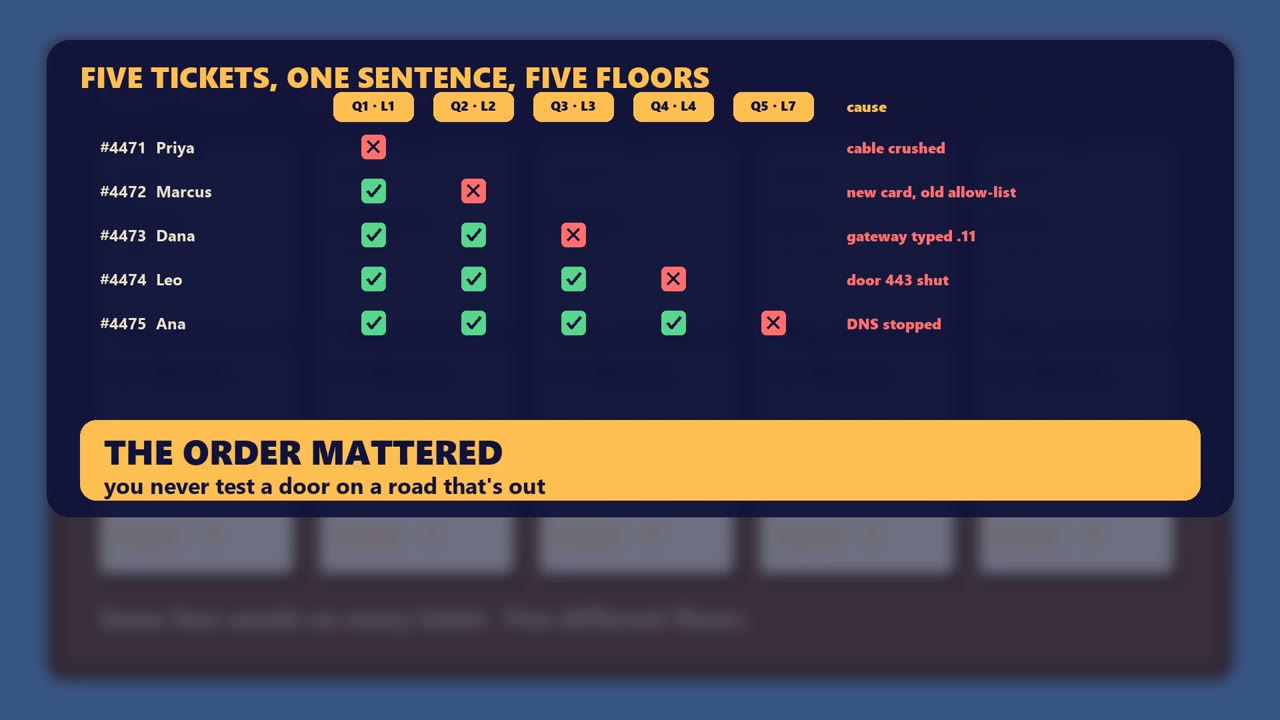
Five tickets, one sentence, five floors. Each ticket passes questions until it reaches the one that fails, and no two stop in the same place.
| Question | Layer | Tool | A fail points to | The ticket |
|---|---|---|---|---|
| Is there a link light? | 1, Physical: the road | The lamp, ipconfig | Cable, port | Cable crushed by a cabinet |
| Can the machine see its neighbours on the street? | 2, Data Link: the crate | ping a neighbour, arp -a | Plaque, switch-depot, allow-list | New card, old allow-list |
| Can it reach the gateway at the end of the street? | 3, Network: the mail bag | ping the gateway ipconfig names | Address, mask, gateway | Gateway typed as .11 |
| Is the door actually open on the far end? | 4, Transport: the truck | Test-NetConnection -Port | Stopped service, firewall | Door 443 shut |
| Does the name resolve to a street number at all? | 7, Application: the Yellow Pages | ping an address, then the name; nslookup | DNS | DNS service stopped |
And the order mattered. You never test a door on a road that's out.
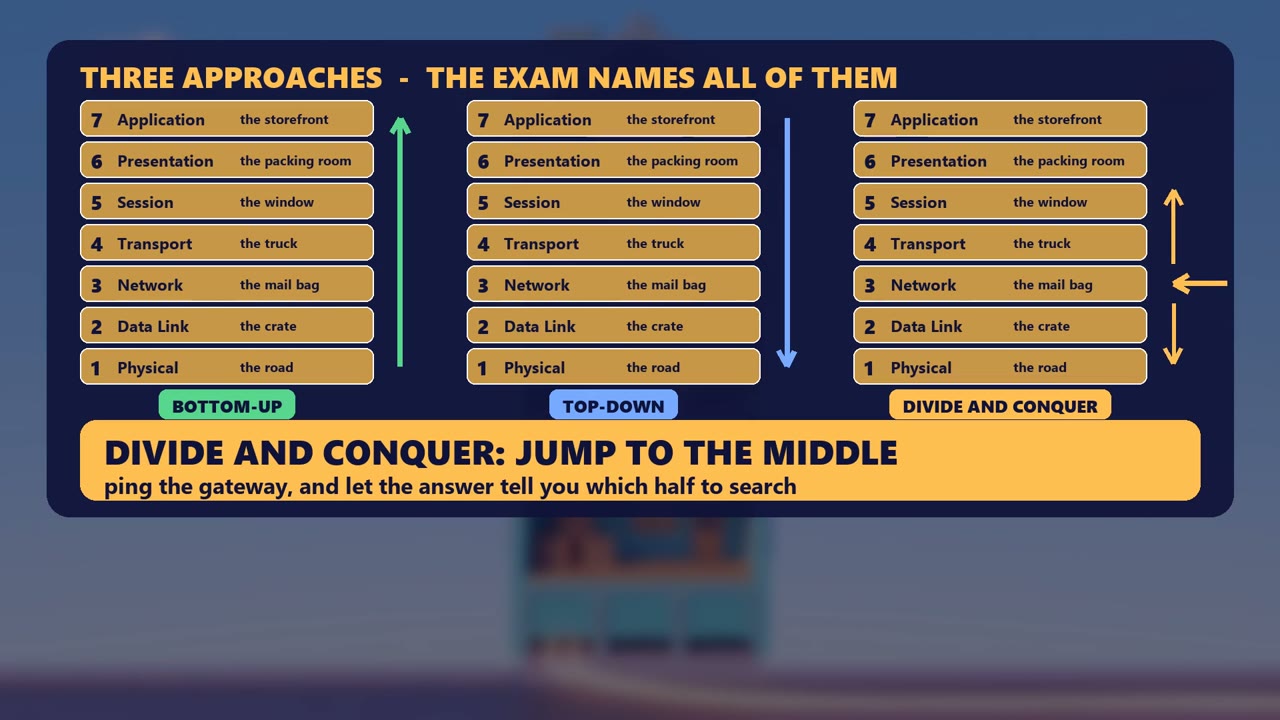
What we just did is called the bottom-up approach: start at the physical layer and climb.
There is a top-down approach too: start at the application and work down. It is the right choice when one program is failing on one machine and everything else works.
And there is divide and conquer: jump straight to the middle, ping the gateway, and let the answer tell you which half to search.
The exam names all three and expects you to pick the one that fits the symptom.
First, a ping that fails is a clue, not a verdict. Some houses are told not to answer the bell.
Second, when all five questions pass and the page still won't load, you have climbed past the door. That is where floors 5 and 6 come back in, along with the storefront itself:
The full troubleshooting method (identify, theorise, test, plan, fix, verify, document) gets a lesson of its own in the Troubleshooting Toolkit series.
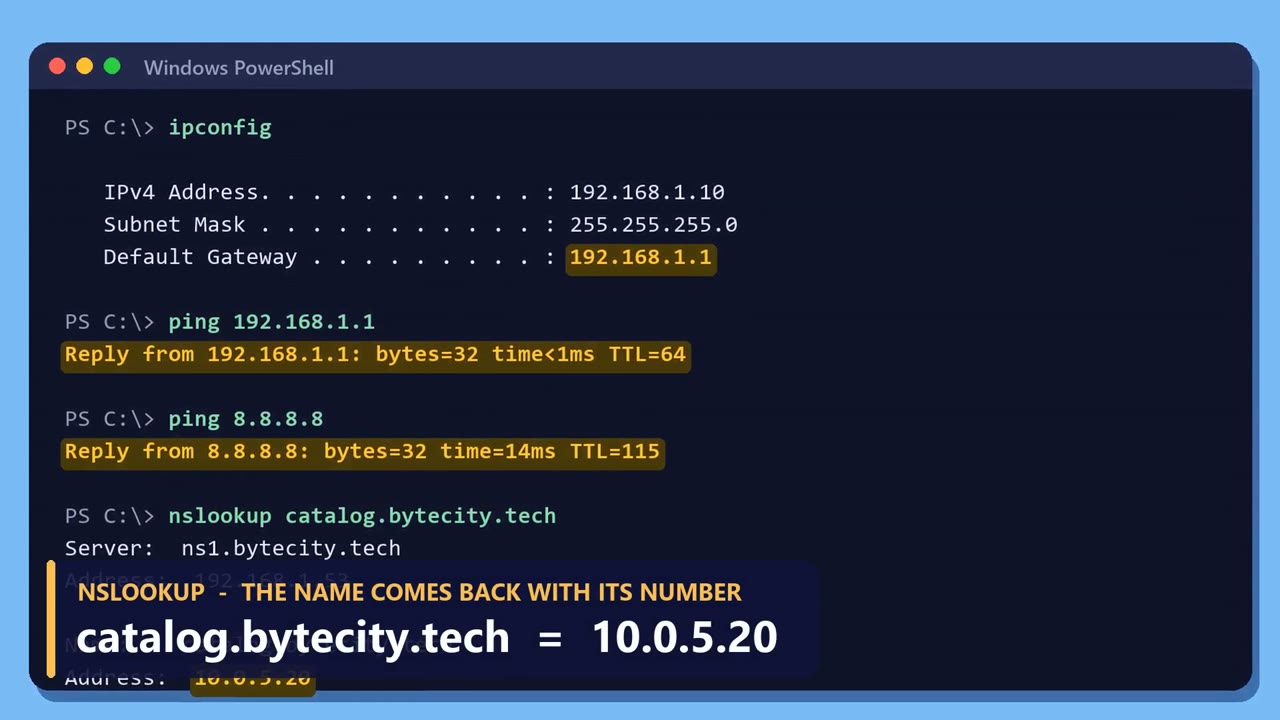
Here are the five questions as five commands, and one ticket run through them in order. The card lives by the desk, and you don't skip a line. A skipped line is a guess wearing a uniform.
ipconfig: Media State Connected, address 192.168.1.10. Question one passes.ping 192.168.1.20: reply. Question two passes.ipconfig gave us, 192.168.1.11: "Destination host unreachable." Stop.Question three failed, so questions four and five don't get asked yet. The door and the Yellow Pages are innocent until the gate answers.
Now read that ipconfig again, slowly. Default Gateway: 192.168.1.11. Nobody lives at .11. Correct it to 192.168.1.1 and run the ladder again. ping 192.168.1.1: reply. ping 8.8.8.8: reply. nslookup catalog.bytecity.tech: the name comes back with its number, 10.0.5.20. The card fills with five green lines.
Ticket closed, and you can write down exactly why. Green lines are evidence. "I rebooted it" is not.
For the Network+ exam: a technician checks the link light, pings the default gateway, then pings a remote server by IP address. Which troubleshooting approach is that? Bottom-up. It started at Layer 1 and climbed. Top-down would have opened the browser first. Divide and conquer would have gone straight to the gateway.
Ask five questions from the bottom up: is there a link light, can the machine reach a neighbour, can it reach its gateway, is the service's port open, and does the name resolve. The first question that fails is where the fault is.
It starts at the physical layer of the OSI model and works up one layer at a time. It suits problems where you don't yet know which layer is at fault, because a low-layer fault can look like many different problems above it.
Top-down starts at the application and works down, which suits one program failing on one machine. Divide and conquer starts in the middle, usually with a ping to the gateway, and the result tells you which half of the stack to search.
Ping by address proves the network path works. If names fail while addresses work, the problem is DNS: check it with nslookup, and look at whether the DNS server is answering.
No. Ping uses ICMP, which has no ports, so it only proves the path to the machine. To test a service, test its port, for example with Test-NetConnection and -Port 443 on Windows.
Five questions on this lesson. Pick an answer to see why.
Previous
8:28One click, seven floors down, across the city, and back. Every layer in one trip.
Next
 8:02
A new firewall on Friday. Monday: web fine, incoming mail fine, nobody can send. Know your doors and it takes one look.
Related
 9:32
Numbered doors, the truck that calls ahead and the bullhorn that doesn't.
Related
 7:17
The mail bag, the road atlas and the gate at the end of the street.
Exam objectives: CompTIA Network+ N10-009: 5.1 (troubleshooting methodology; top-to-bottom, bottom-to-top and divide-and-conquer OSI approaches), 5.5 (ping, ipconfig, arp, nslookup, Test-NetConnection), 1.1 (OSI layers).
Byte City is not affiliated with or endorsed by CompTIA.