 8:07
OSI Model
Ping Works, Names Don't: DNS and the Application Layer | OSI Layer 7
The storefront, the mail room and the Yellow Pages, where every conversation begins.
8:07 Watch
One click. That's all it takes — and in this episode we follow everything that click sets off: seven floors down through the house, across Byte City, seven floors back up at the far end, and the answer making the same trip in reverse. Nothing new is taught. Every object, number and rule from the seven layer lessons is used exactly as it was taught there, in one delivery.
You click a link. That's all it takes. This lesson follows everything that one click sets off: seven floors down through your house, out onto the road, across Byte City, and seven floors back up at the far end. Then the answer makes the same trip in reverse.
Nothing new is taught here. Every layer, every wrapper and every number comes from the earlier lessons, used exactly as it was taught there. You have walked each floor on its own. Now we take the stairs.
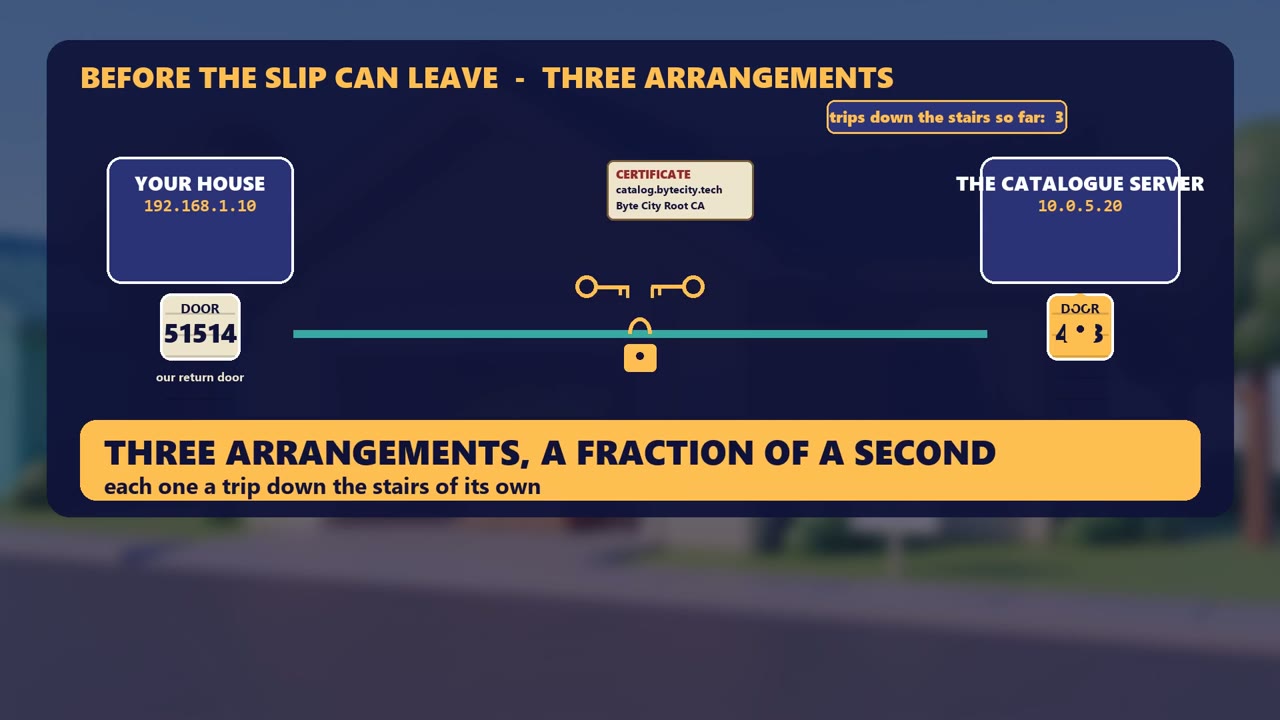
The click is a request slip: "get me the catalogue page." But before that slip can go anywhere, three things are arranged, and each of them is a trip down the stairs of its own.
First, the Yellow Pages. The link says catalog.bytecity.tech, and trucks need numbers. One bullhorn shout to door 53, and the answer comes back: 10.0.5.20. That is the server across town, the same house the truck reached in the Layer 4 lesson. In real names, that is a DNS lookup over UDP.
Second, the call-ahead. The truck knocks at door 443 from our return door, 51514. The far end answers, and we confirm. Those are the three knocks of the TCP three-way handshake. The doors are now open at both ends.
Third, the lock. The far end shows its ID card, its certificate. The two houses agree a key, and from now on everything through door 443 is wrapped. That is the TLS handshake.
Three arrangements, a fraction of a second. Only now can the slip itself take the stairs.
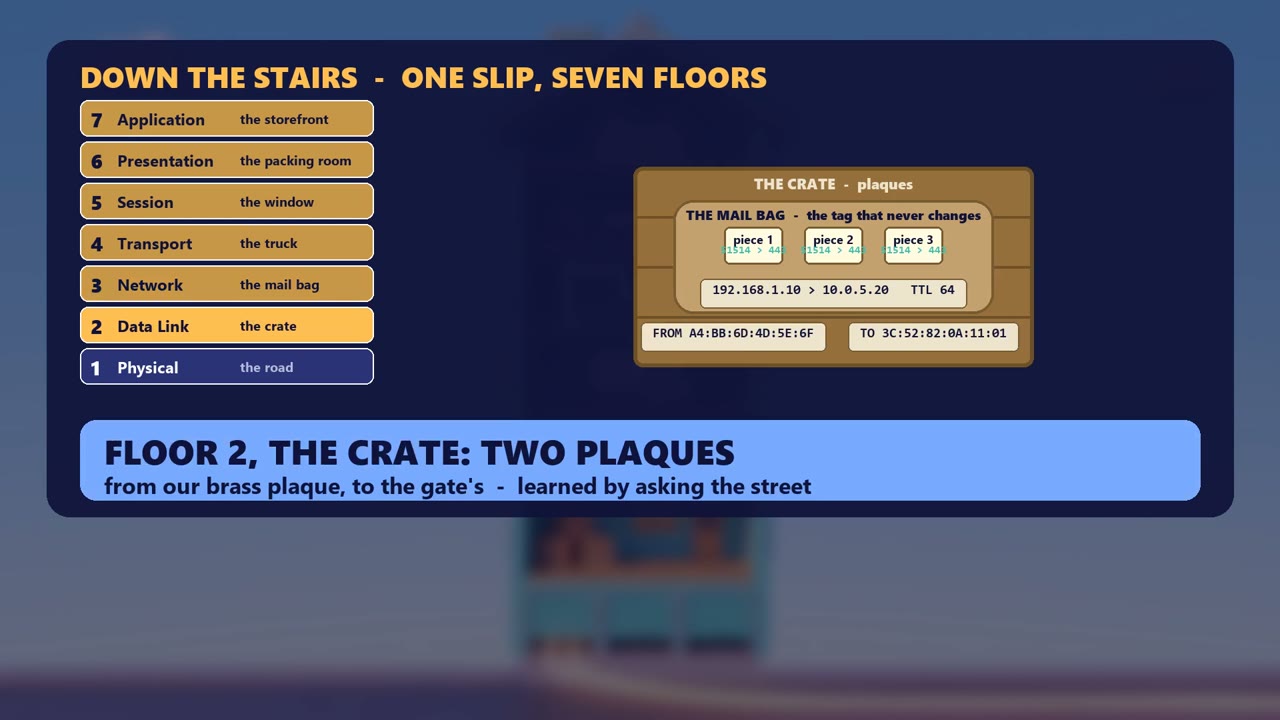
Floor 7, the storefront. The slip is written: "GET /catalog". That is the data.
Floor 6, the packing room. Label it (plain text, UTF-8), seal it, and shrink-wrap it, because the road is public. From here on nobody on the road can read the slip.
Floor 5, the window. This slip belongs to the conversation we opened with the catalogue server. It is stamped onto that window, so the answer comes back to the right one.
Floor 4, the truck. The slip is cut into numbered pieces, and each piece gets the TCP tag: from door 51514, to door 443. A signature will be expected for what arrives. (Simplified, as in the Layer 4 lesson: one real signature can cover a whole run of pieces.)
Floor 3, the mail bag. Each piece goes into a bag with the tag that never changes: from 192.168.1.10, to 10.0.5.20. The tag also carries the expiry stamp, 64. The atlas says: that's not my street. Send it to the gate.
Floor 2, the crate. The bag goes into a crate with two plaques: from our brass plaque, A4:BB:6D:4D:5E:6F, to the gate's plaque, 3C:52:82:0A:11:01. Our house learned the gate's plaque by asking the street.
Floor 1, the road. The crate becomes a stream of light in the glass tube, or pulses in the copper. It's gone.
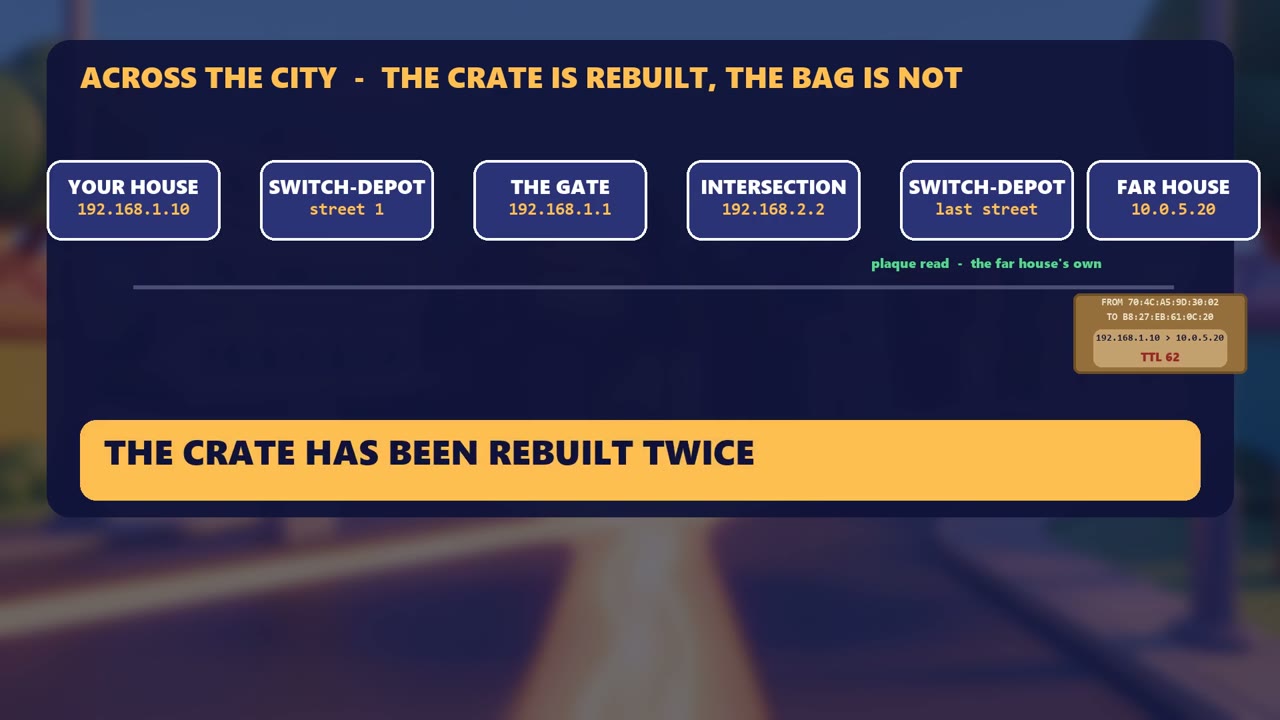
On our street, the switch-depot reads the crate's plaque, the gate's, and forwards it out of the right ribbon. It never opens the crate. Floor 2 only.
At the gate, the crate is opened and the bag comes out. The atlas row reads 10.0.5.0/24 via 192.168.2.2. The stamp is punched: 63. Then the bag goes into a brand-new crate, with the gate's far-side plaque as sender, 3C:52:82:0A:11:02, and the next intersection's plaque as receiver, 70:4C:A5:9D:30:01. Plaques belong to streets, and this is a new street.
At the second intersection it happens again: bag out, atlas, stamp punched to 62, new crate. This time the plaques read from 70:4C:A5:9D:30:02, to B8:27:EB:61:0C:20.
On the last street, the crate carries the far house's own plaque. The switch-depot there reads it, and the crate arrives at the garage.
Look at what changed and what didn't. The bag inside has never been re-addressed: it still says 192.168.1.10 to 10.0.5.20. Only its expiry stamp moved, 64 to 63 to 62, one punch per router. The crate, meanwhile, has been rebuilt twice. IP addresses stay the same for the whole trip. MAC addresses change at every hop.
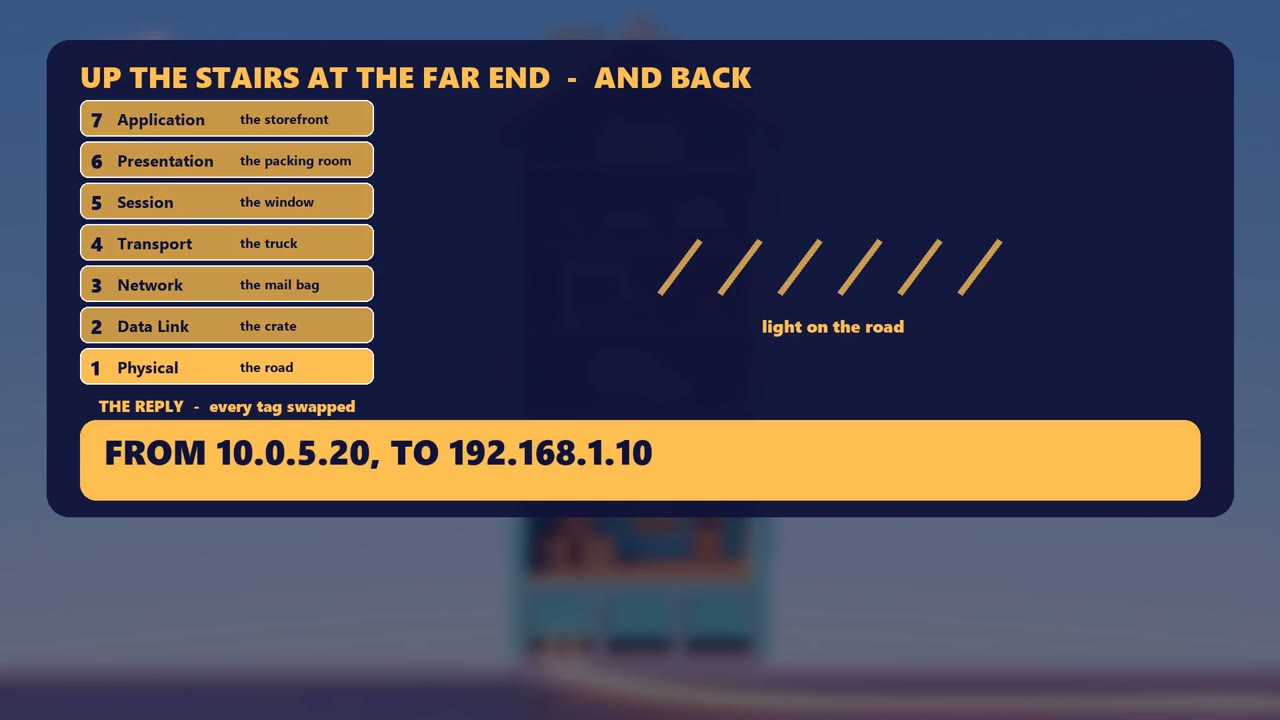
At the far end, the same seven floors are climbed upwards, and each wrapper comes off in turn.
Then the receipt takes the stairs down, with every tag swapped. From 10.0.5.20, to 192.168.1.10. From door 443, to door 51514. It crosses the city, punched twice and re-crated twice, and climbs our own stairs until floor 7 hands your browser a page.
That is one click. The round trip for a page takes about a tenth of a second.
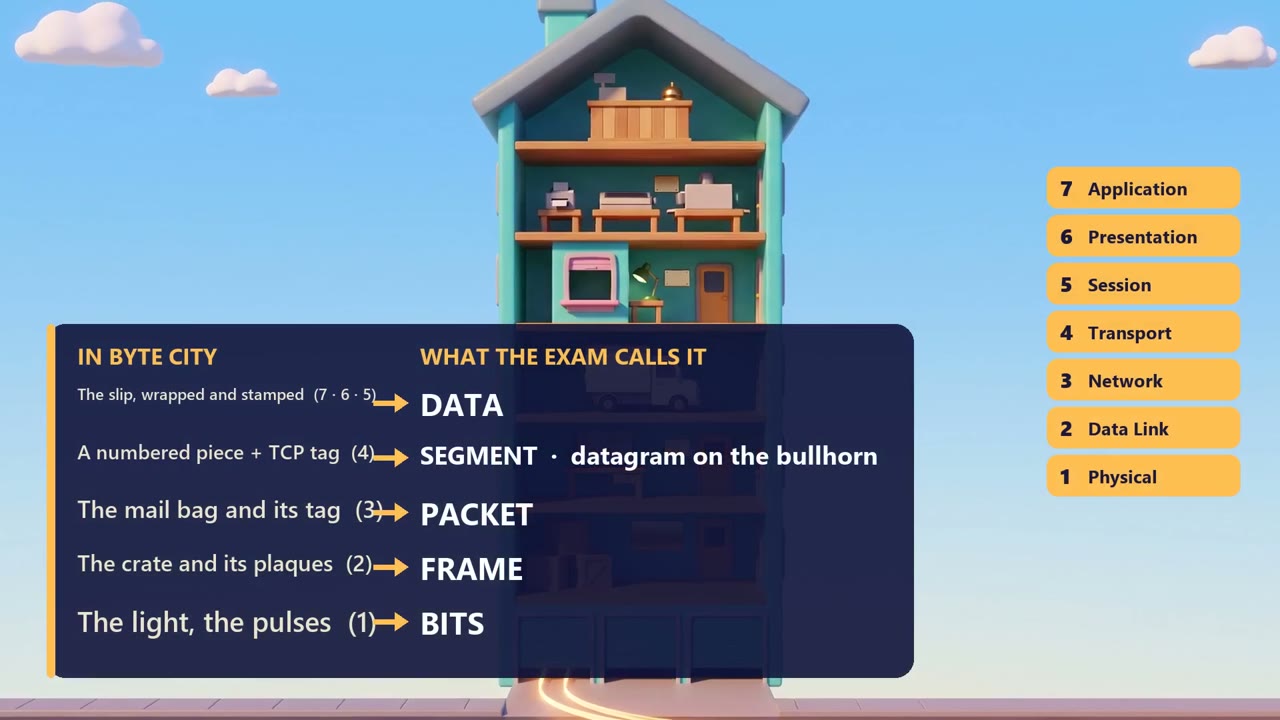
This is the part the exam loves. Each wrapper has a real name, and the general term for them is the protocol data unit, or PDU.
| Floor | In Byte City | What the exam calls it | Who works here |
|---|---|---|---|
| 7, 6, 5 | The slip, wrapped and stamped | Data | The application and its libraries |
| 4 | A numbered piece with its TCP tag | Segment (TCP), datagram (UDP, the bullhorn) | Firewalls read the doors |
| 3 | The mail bag and its tag | Packet | Routers read the bag |
| 2 | The crate and its plaques | Frame | Switches read the plaque |
| 1 | The light, the pulses | Bits | Cables, radios, hubs |
Data, segment, packet, frame, bits. The exam will ask you which name belongs to which floor.
Each wrapper also tells you who works on that floor. A switch reads plaques, which means frames, and never opens the crate. A router opens the crate, reads the bag, which means packets, and punches the stamp. A firewall reads the doors on the TCP tag.
The wrapping on the way down is called encapsulation. The unwrapping on the way up is de-encapsulation.
And the honest footnote, one last time. The seven floors are the map. The real building has fewer walls: the top three floors are one room in practice, and engineers argue about where the lock lives. Use the map. Don't mistake it for the building.
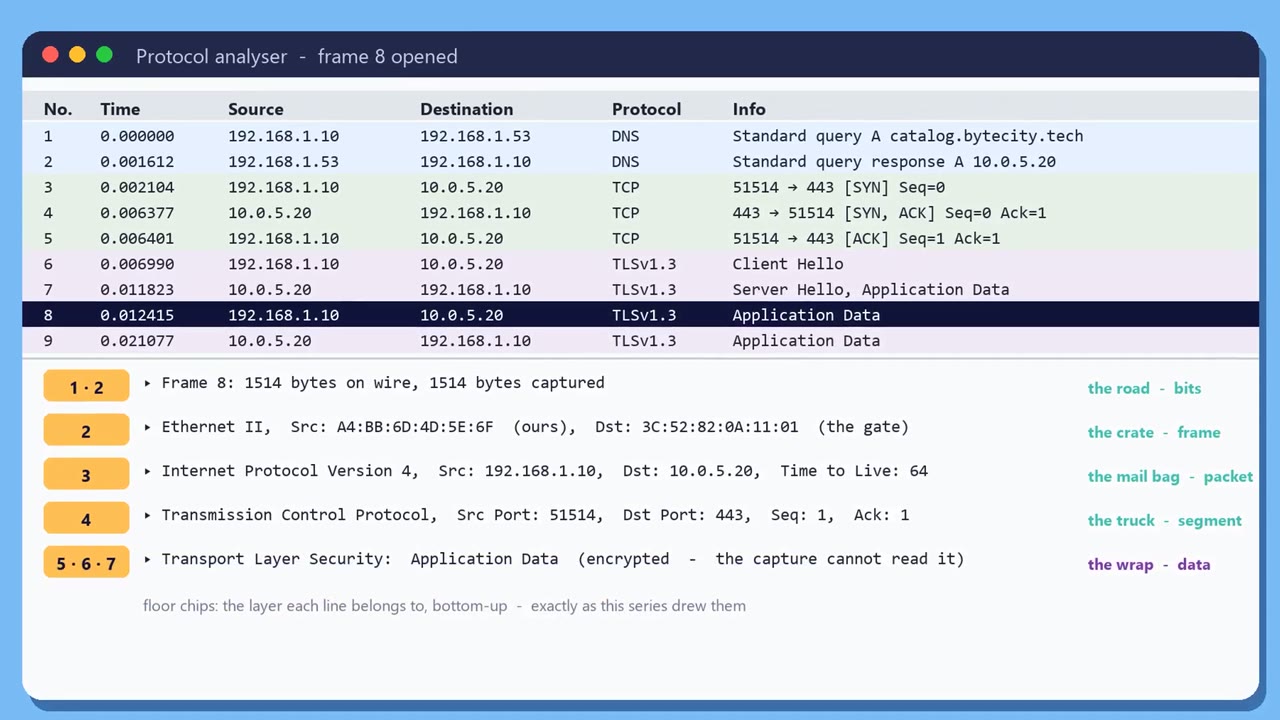
Here is the same click, as a packet capture. Every row is one crate on the road, and you can read the whole trip in nine of them.
Twenty-one milliseconds, start to finish, for these nine frames.
Now open row 8. The capture shows you the floors from the bottom up, exactly as this series drew them. The frame: from our plaque, A4:BB:6D:4D:5E:6F, to the gate's plaque, 3C:52:82:0A:11:01. Inside it the packet: from our address to the server's, 192.168.1.10 to 10.0.5.20, Time to Live 64. Inside that the segment: from port 51514 to port 443. And inside that, the wrap, which the capture cannot read, because it isn't the far end.
Notice the destination MAC address. A capture taken on our computer shows the gate's plaque, not the server's, because the crate only ever carries the next stop. Every Byte City picture is in that one pane. Reading captures gets a complete lesson of its own.
For the Network+ exam: at which OSI layer is the protocol data unit called a packet? Layer 3, Network. The bag with the tag. Frames are the crate; segments are the pieces.
Your computer first looks up the name in DNS, opens a TCP connection with a three-way handshake, and agrees encryption with TLS. Then the request is encapsulated down the layers, routed across the network, de-encapsulated at the server, and the response comes back the same way.
Each layer wraps the data from the layer above with its own header on the way down: a TCP header, then an IP header, then an Ethernet frame. At the far end each layer removes its own wrapper on the way up, which is de-encapsulation.
Data at Layers 5 to 7, a segment at Layer 4 (a datagram for UDP), a packet at Layer 3, a frame at Layer 2 and bits at Layer 1. The exam often asks you to match the name to the layer.
No. The source and destination IP addresses stay the same across a routed path, while the TTL drops by one at every router. The MAC addresses change at every hop, because each router builds a new frame for the next network.
A list of every frame seen on the wire, and for any one frame its layers from the bottom up: Ethernet, IP, TCP and the payload. Encrypted payloads such as TLS application data show up, but their contents can't be read.
Five questions on this lesson. Pick an answer to see why.
Previous
8:07The storefront, the mail room and the Yellow Pages, where every conversation begins.
Next
 8:00
Five tickets, four words: "the internet is down." Five questions, bottom up, find the floor.
Related
 9:32
Numbered doors, the truck that calls ahead and the bullhorn that doesn't.
Related
 8:11
The packing room: the label printer, the vacuum sealer and the lock on door 443.
Exam objectives: CompTIA Network+ N10-009: 1.1 (OSI layers, encapsulation and de-encapsulation, PDUs), 1.4 (ports and protocols), 1.6 (DNS), 5.5 (protocol analyser output).
Byte City is not affiliated with or endorsed by CompTIA.